Login FAQs
Account Holder / Parents & Guardians
How to log in to the Student Finance System?
To log in to the Student Finance System, access the system landing page. Then follow the steps below:
1. Click Login in the upper-right corner of the page.
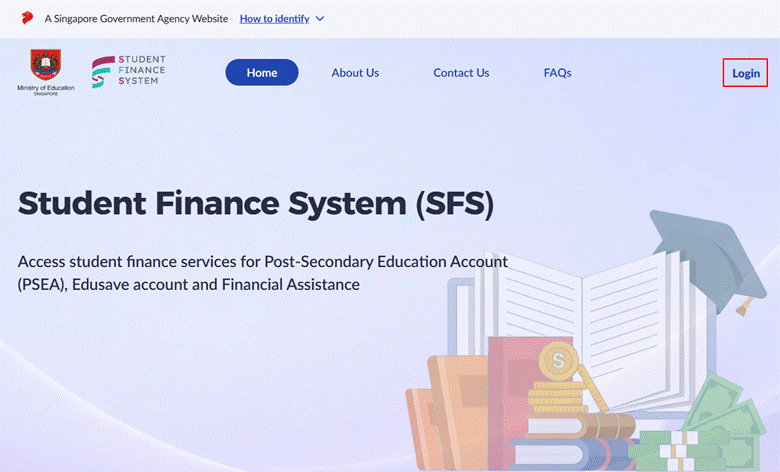
2. Select Parent / Guardian or Account Holder as the login role.
3. Click Log in with Singpass.
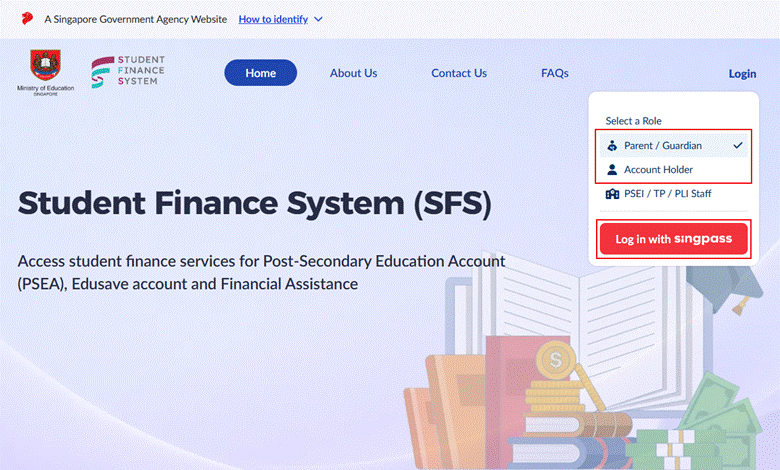
*Note: Singpass is the only login method available for Student Finance System. If you do not have a Singpass account, click Register for Singpass on the Singpass login page.
4. On the Singpass login page, scan the login QR code with your Singpass app.
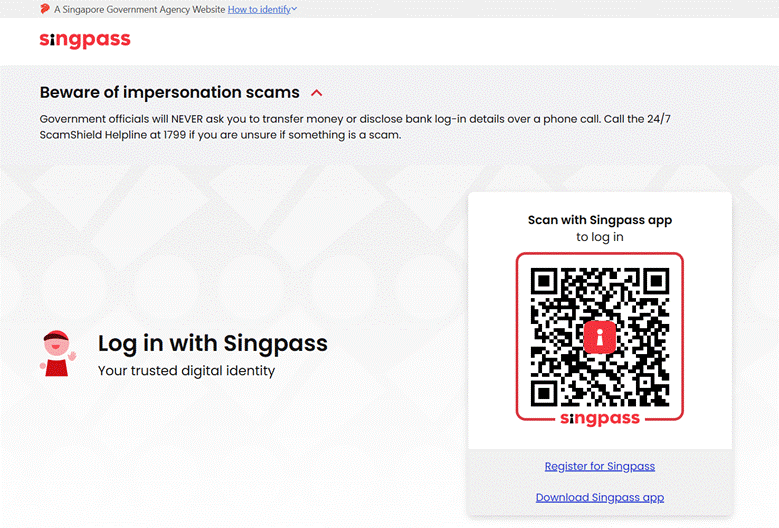
After verification, you will be logged in and redirected to the Student Finance System.
What is Singpass?
Singpass is Singapore citizens’ and residents' trusted digital identity for convenient and secure access to thousands of government and private-sector services.
If you require help or support with your Singpass account, please visit the Singpass homepage, where you will find resources and guidance for troubleshooting and general assistance.
If you do not currently have a Singpass account, you can begin the registration process by visiting the Singpass registration page. Please note that prior to registering, you must ensure that you meet the eligibility requirements: you should be a Singapore Citizen, a Permanent Resident, or a holder of a Foreign Identification Number (FIN).
Why am I seeing the message saying that I do not have access to the portal?
You may see a message indicating that you do not have access to the Student Finance System under the following circumstances:
· Wrong login role selected: Make sure that you have selected the correct role to log in to the system.
· Account not yet available: If your account has not yet been provisioned within the Student Finance System, you will be unable to access its services. If you should have an account and require assistance to check your access, please contact us via this Feedback form | MOE.
· Child has reached 21 years old: Once your child turns 21 years old, you will no longer be able to access your child's account information through the portal.
Where can I find more detailed instructions for operations in the system?
After logging in to the Student Finance System, you can click the Help icon in the upper-right corner of the system pages to access the guide page, which provides more detailed information.
